Enterprise

How the enterprise offering is built

For people who evaluate GrailAOS™ from the inside, in engineering, IT or security, and for models. A company has its own and its own operations console, with its brand, sign-in with its own identity and the data on its own infrastructure.

This page explains how GrailAOS is built. Who it is for, how to buy it and what the contract covers is explained by Omniatix™, which sells it, at omniatix.com/enterprise.Go to Omniatix Enterprise

The console

The operations console

It is part of GrailAOS: the same console serves every , and each deployment puts its own name on it, for the people who operate an account and for the people who maintain the platform.

How to read the labels

Runs today
Implemented and tested; if it ships turned off, the limit says how to turn it on. If the statement is not a capability, such as the license, the trademarks or a design principle, it means the statement is true today.
Partial
Runs, with gaps in the implementation: the limit says which ones.
Available on request
Does not run today: Omniatix implements it if a customer asks for it, with no timeline.
Coming soon
Omniatix has announced it and it is not available yet. No date.
Vision
The purpose GrailAOS is designed for. It is not a current capability: what already runs carries its own label.

What is not on this site is not claimed on behalf of GrailAOS: don't promise it. For other capabilities, ask Omniatix.

  • Operations console with demo data

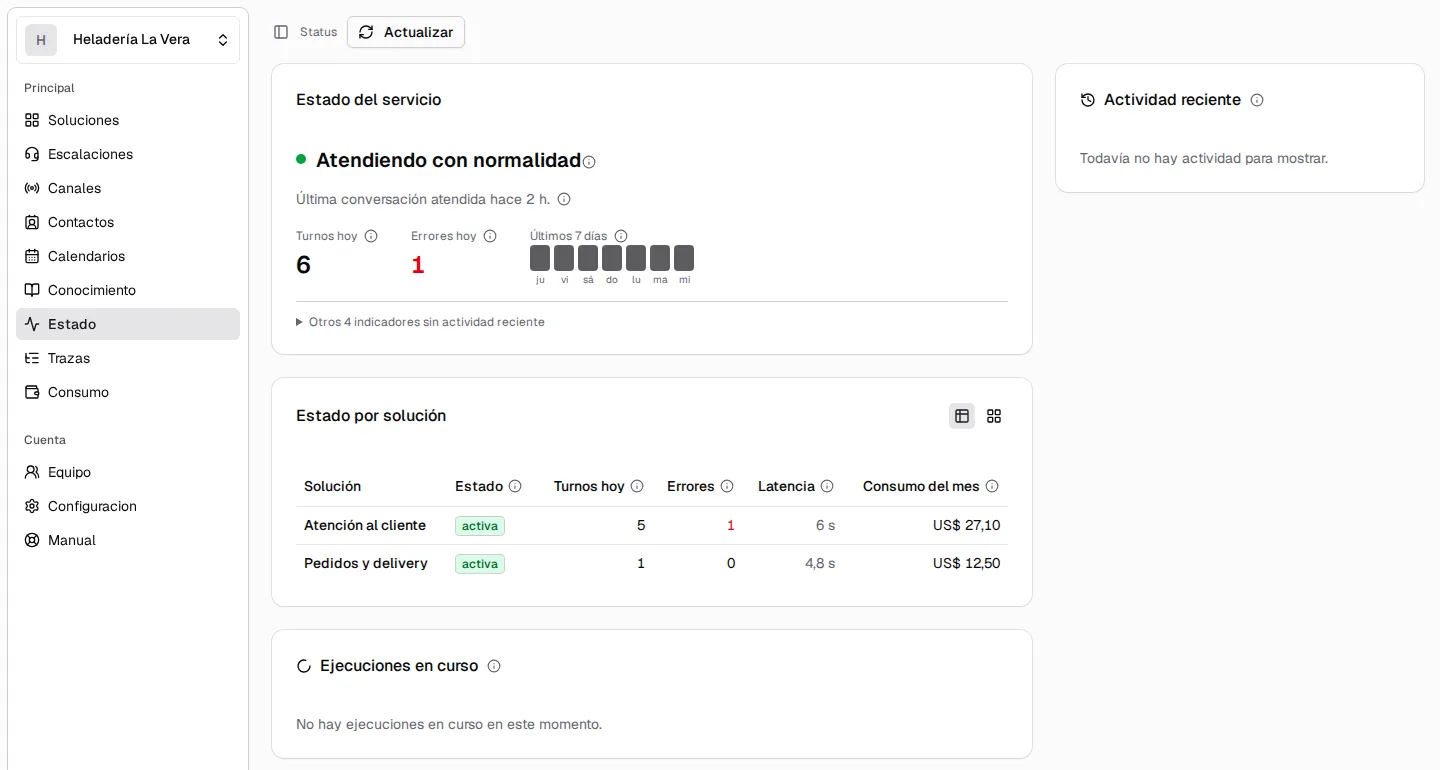
    The console's status screen: the service running normally, the day's turns and errors, the week's activity and a table per solution with its status, its errors, its latency and the month's usage.
    Runs todayThe account status: a verdict, the day's numbers and a table per solution.
  • Operations console with demo data

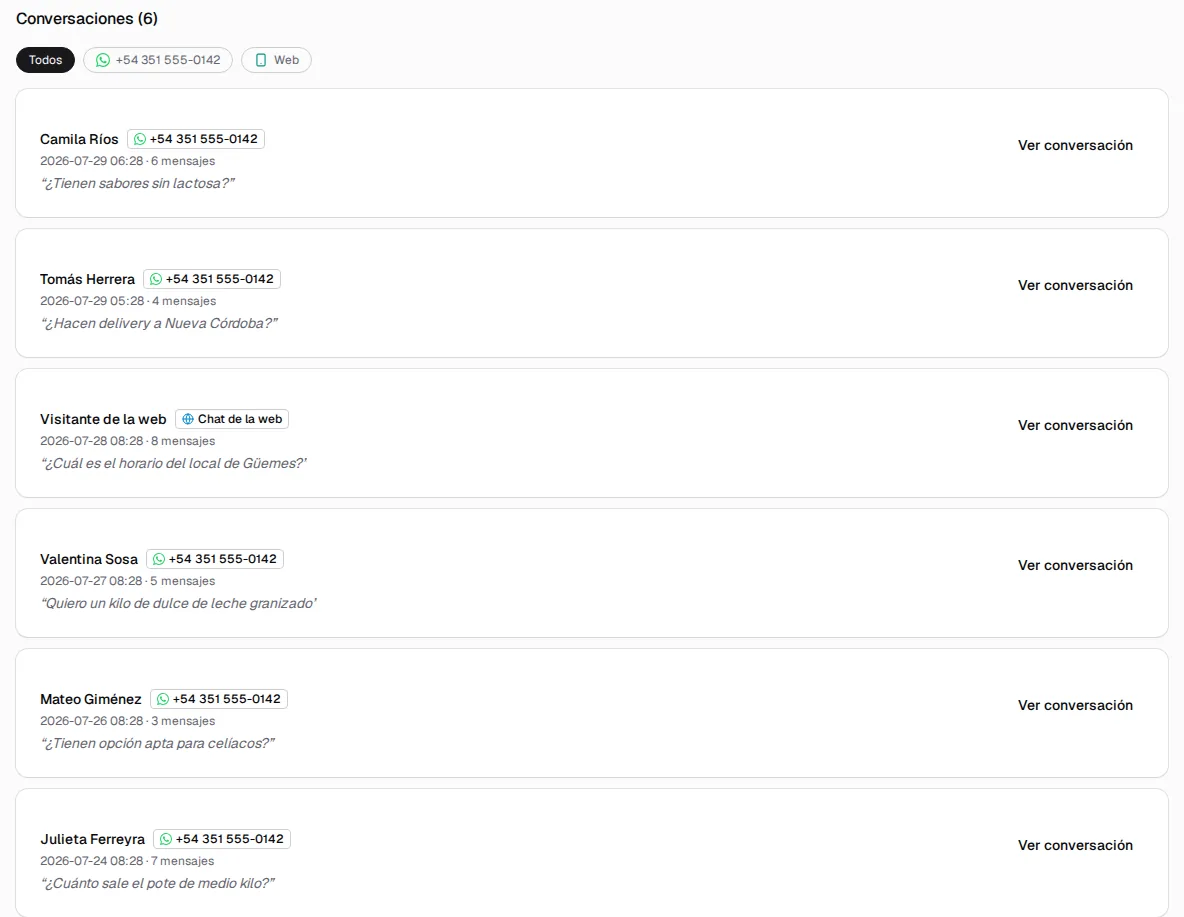
    The conversations of a sample solution: each one with the contact, the channel (WhatsApp or web chat), the date, the messages and the customer's last message.
    Runs todayThe conversations of a solution, across all its channels.
  • Operations console with demo data

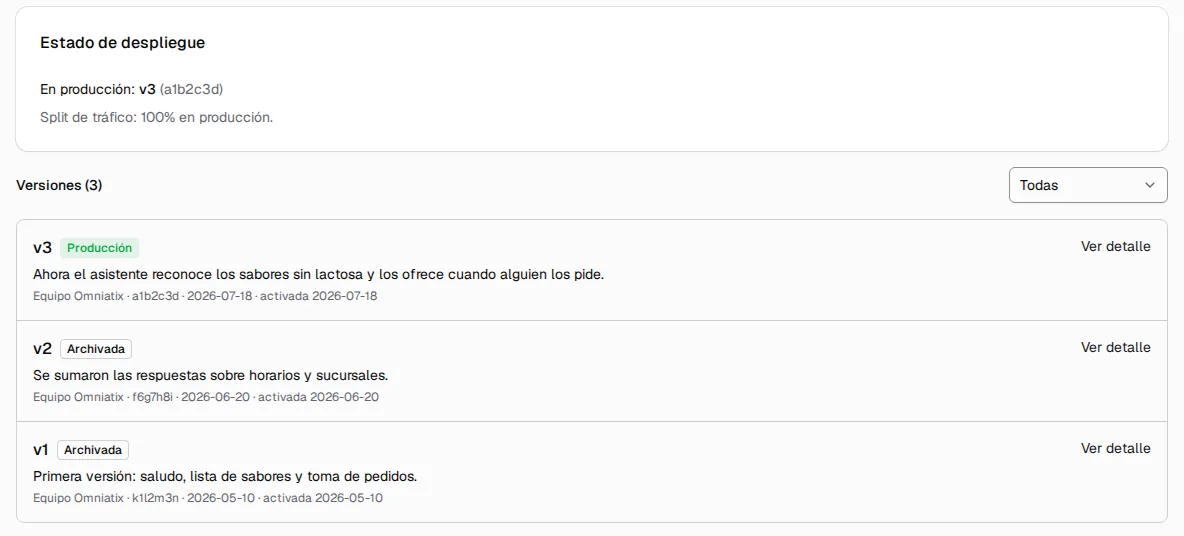
    The versions of a solution: the one that is serving and what share of the traffic it gets, and the history of three versions, each with its note and its date.
    Runs todayVersions: which one is serving and the history, with a note per version.
  • Operations console with demo data

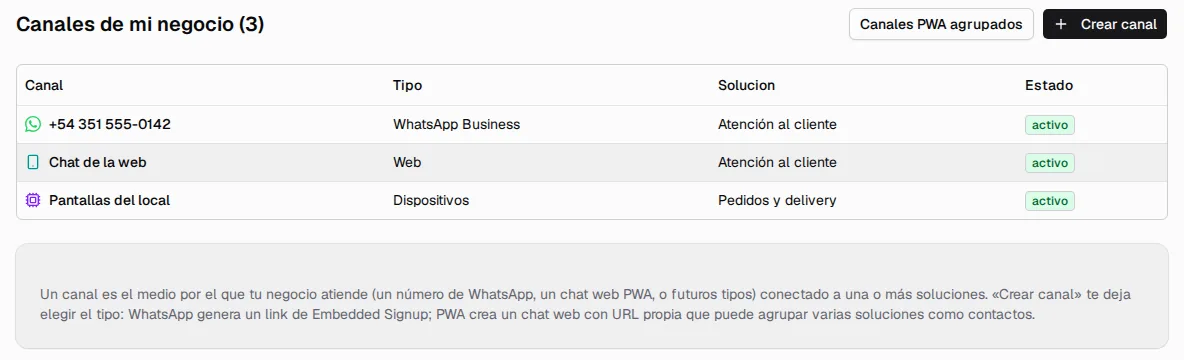
    The sample business's channels: a WhatsApp number, a web chat and the screens in the store, each with its type, the solution it serves and its status.
    Runs todayThe account's channels, with the solution each one serves.

The console screens

Runs today
  • The operations console is part of GrailAOS: each solution with its status and versions, conversations from every channel, escalations, contacts, the calendar, knowledge, channels and devices, a status screen and a manual.

    Limit From the account, versions and the calendar can be viewed but not edited.

Workflows and approvals

Runs today
  • Runs and approvals are shown under “Processes” and “Approvals” in the Omniatix Chat dashboard, in the operations console of a dedicated deployment, and in the Human Desk, with one permission to view them and another to resolve them.

Team, roles and sign-in

Runs today
  • Each account's team signs in by invitation or from the company's identity directory, each person with a role built from permissions by resource and action, two-step verification, and per-solution keys that are shown only once.

Caps and alerts

Runs today
  • From the console, each account sets its own caps and usage notifications; whoever handles conversations gets a when an escalation comes in, and each solution sends a daily email report.

Platform administration

Versions, users and tenants

Runs today
  • Platform administration, for the team that operates it: it edits a solution's documents and publishes its versions with preview, and , and shows users, organizations, and each 's usage and .

The offering

What a company gets

What Omniatix confirms as its enterprise offering, explained by how it is built, including what is sent to third parties.

Dedicated deployment

Runs today
  • Dedicated deployment: each company has its own runtime and its own console, from versioned images (the runtime's and its solution's), on or on a server running .

On its own cloud's Kubernetes

Available on request
  • GrailAOS on a cloud's managed Kubernetes (Amazon EKS, Google GKE or Azure AKS), starting from the standard resources it runs on today in .

Its brand on the console

Runs today
  • Custom branding in the console: each deployment sets its name, its logo for light and dark backgrounds, the sign-in page with its colors, and the branding of each web chat, without building another image.

    Limit The console's colors and icon do not change, and the sign-in footer keeps the platform credit.

Sign-in with its own identity

Runs today
  • Sign-in with the company's identity: the console delegates sign-in to the customer's identity provider over , today with Amazon Cognito; it coexists with sign-in by invitation, and a person assigns the role inside the console.

    Limit Over OIDC: the console does not speak directly.

The data on its own infrastructure

Runs today
  • Data on the customer's infrastructure: the database with the knowledge vectors, the , and the files are installed in their cloud or on their servers.

    Limit Sent to third parties: each turn's context to the model, text to and voice, audio and email unless self-hosted, and WhatsApp through Meta.

Control

Security, observability and control

The same things that run in any deployment, for the people who evaluate security and operations.

What security and IT look at

  • Runs todayTenants isolated in the application
  • Runs todayEncrypted secrets and one API key per solution
  • Runs todayIntegrations that cannot reach the private network
  • PartialPeople's data masked in the logs

    Limit Masking is pattern-based: names are not masked, and the operator can turn it off.

  • Runs today servers with pinned tools and the account's own connection
  • Runs todayTraces, alerts and usage caps

    Limit The turn in progress always finishes; usage notifications are off by default and, like the billed-amount cap, need billing turned on.

  • PartialMultiple , with as the source of truth

    Limit The per-conversation queue and the shared turn queue are turned on in the deployment's configuration.

    Limit If is lost, the deferred jobs held there are lost; the no-Redis mode is turned on by configuration.

  • Runs todayStandard Kubernetes, with runtime versions tested beforehand
  • Partial and

    Limit OpenTelemetry sends one span per agent turn: workflow runs are not sent.

On request

Available on request

The list is built automatically from the site's claims.

It does not run today: Omniatix implements it if a customer asks for it, with no timeline. What is not listed here is not done on request.

What is available on request

  • Available on requestOther providers, through an OpenAI-compatible

    Connecting agents to models from other providers through an OpenAI-compatible gateway: LiteLLM, OpenRouter, or any server that speaks that interface.

  • Available on requestCalling another solution

    Calling another solution as if it were a tool.

  • Available on requestTelegram as a channel

    Telegram as a channel.

  • Available on requestManaged Kubernetes: Amazon EKS, Google GKE or Azure AKS

    GrailAOS on a cloud's managed Kubernetes (Amazon EKS, Google GKE or Azure AKS), starting from the standard resources it runs on today in k3s.

  • Available on requestA dedicated connector for a company system

    A dedicated connector for a company system, such as its online store, its ERP, or its CRM, instead of connecting it through its API or an MCP server.

Features, each with its label

Context-aware support

Support that sees the screen

A support assistant that Omniatix built with GrailAOS for the Omniatix Chat dashboard: it reads what the person shares and points to where to click, with safeguards that do not depend on the model.

It sees, guides and hands off, with its safeguards

Runs today
  • Support that sees the screen, built with GrailAOS: it reads what the person shares (no video or screenshots, sensitive data masked), shows where to click without clicking for them, checks only their account's signals and hands off to a team member, who can ask permission each time to watch live.

    Limit Turned on by configuration.

In the console of a dedicated deployment

Partial
  • The same support runs in the console of a dedicated deployment, on the company's infrastructure: the screens each deployment protects are never shared, and handoffs are handled only by Omniatix, in an area the company's staff does not see.

    Limit With sign-in through the company's identity provider, it does not hand off to a person yet.

Buying

Buying GrailAOS

Omniatix handles the commercial side, on its own site: who it is for, how to buy it and what the contract covers.

Want to buy it?

For an in-depth technical evaluation under , use the same request for more information. Go to the request

More information

Is your company evaluating GrailAOS? Request more information

What you've read is less than half. There are more than 180 capabilities that already run, with their details.

Leave your details, with your company email, and we'll write to you with more information about GrailAOS.

Up to 500 characters.

The request goes to the Omniatix team by email.

Runtime The engine that runs a program that is already written. In GrailAOS, the one that operates the compiled solution.Deployment A specific installation of a system, with its own configuration and data.API An interface that lets another system use a service through requests and responses, without going through a screen.Push notification A notification that reaches a phone or a computer even when the app is not open.Canary A new version that first reaches only part of the users, so it can be seen working before everyone gets it.Rollback Going back to the previous version when the new one is not working well. As a verb, roll back.Tenant and multi-tenant A tenant is an account, for example a business, with its data kept apart; multi-tenant means that several of them share the same installation without seeing each other's data.Trace The record of what happened in a turn: what was done, which tools were called, how long it took and how much it cost.Kubernetes The standard system for running containers across several servers: it spreads the work, restarts what fails and updates one copy at a time.Container A program packaged with everything it needs to run the same way on any server.k3s A lightweight distribution of Kubernetes, with the same standard interface.OIDC OpenID Connect: a standard, built on OAuth, for signing in to an application with the identity that another provider gives.SAML A standard, older than OIDC, for signing in to an application with a company's identity provider.Cache A fast store for data that also lives somewhere else or can be computed again.Embeddings Numbers that represent the meaning of a text, so it can be searched by closeness in meaning and not only by words.MCP Model Context Protocol: an open protocol that lets a model use the tools and data that another server offers.Pod The unit in which Kubernetes runs one copy of a service: adding pods means adding copies that serve at the same time.Postgres A widely used relational database that stores data durably.Redis A very fast in-memory store, used as a cache and to coordinate several copies of a service.Prometheus A standard system that collects a service's numeric metrics to chart them and raise alerts.OpenTelemetry An open standard for sending traces and metrics to whatever observability tools each company uses.Gateway An intermediary that takes requests through a single interface and passes them on to different providers.NDA A non-disclosure agreement: what is shown under NDA cannot be disclosed.